16. Surface-hopping nonadiabatic dynamics
Note
We now have many more solutions for NAMD simulations, such as via fine-tuning the fast universal ML potential for excited-state simulations OMNI-P2x. This text does not reflect the newest developments yet.
Many processes, i.e., photophysics and photochemistry but also many reactions, occur not just on a ground-state PES but involve other electronic states:
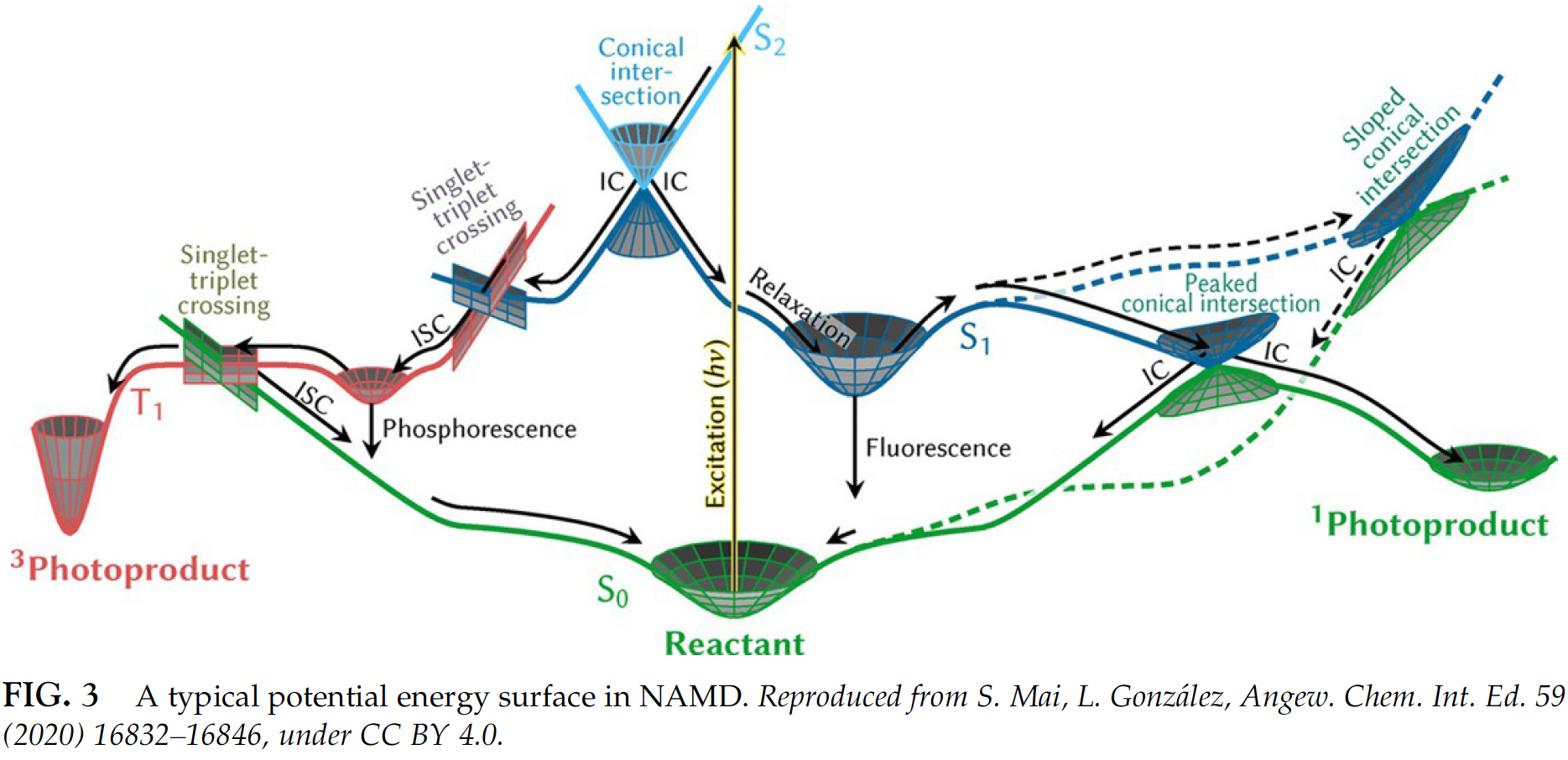
Simulating their dynamics properly is even more complicated. One of the most popular approaches is the so-called surface-hopping nonadiabatic dynamics where many trajectories are propagated starting from different states. In each trajectory, the molecule is allowed to hop from one electronic surface to another and then we can count how many trajectories at a given time stay on each surface (the percentage is called population). This is very computationally intensive task and, hence, ML is also eagerly awaited solution which is still far from trivial to use in nonadiabatic simulations. MLatom can also perform such simulations but currently only in Python. The results with AIQM1 which does not need any training are often quite good too.
The tutorial below is adapted from MLatom’s documentation prepared together with Lina Zhang.
In this tutorial we show how to perform nonadiabatic molecular dynamics (NAMD) with MLatom (and its interfaces to Newton-X whenever required). The simulations are only possible through the Python API. MLatom currently only supports NAC-free Landau–Zener–Belyev–Lebedev (LZBL) surface hopping.
Here we show two examples of how to propagate dynamics with:
the universal AIQM1 method (ML-improved semi-empirical QM approach faster than DFT)
See our paper for more details (please also cite it if you use this feature):
Lina Zhang, Sebastian Pios, Mikołaj Martyka, Fuchun Ge, Yi-Fan Hou, Yuxinxin Chen, Joanna Jankowska, Lipeng Chen, Mario Barbatti, Pavlo O. Dral. MLatom software ecosystem for surface hopping dynamics in Python with quantum mechanical and machine learning methods. J. Chem. Theory Comput. 2024, 20, 5043–5057. DOI: 10.1021/acs.jctc.4c00468. Preprint on arXiv: https://arxiv.org/abs/2404.06189.
16.1. Slides
16.2. From training to population
Notebook msani.ipynb, materials (materials.zip, unpack in folder materials).
#Import MLatom as a Python package.
import mlatom as ml
#First, we define a MS-ANI model
model = ml.models.msani(model_file='fulvene_tutorial.npz',nstates=2)
model loaded from fulvene_tutorial.npz
#then, we load the training data as a MLatom molecular database. This is a small dataset for
#demo purposes.
train_data = ml.data.molecular_database.load("materials/tutorial_data.json", format="json")
#Now we can train the model.
model.train(molecular_database=train_data,
            property_to_learn='energy',
            xyz_derivative_property_to_learn='energy_gradients',
            hyperparameters={'max_epochs': 100}) #100 epochs is not enough, only for demo.
DataParallel(
  (module): StateInputNet(
    (AEV_computer): AEVComputer()
    (network): ANIModel(
      (C): Sequential(
        (0): Linear(in_features=129, out_features=160, bias=True)
        (1): CELU(alpha=0.1)
        (2): Linear(in_features=160, out_features=128, bias=True)
        (3): CELU(alpha=0.1)
        (4): Linear(in_features=128, out_features=96, bias=True)
        (5): CELU(alpha=0.1)
        (6): Linear(in_features=96, out_features=1, bias=True)
      )
      (H): Sequential(
        (0): Linear(in_features=129, out_features=160, bias=True)
        (1): CELU(alpha=0.1)
        (2): Linear(in_features=160, out_features=128, bias=True)
        (3): CELU(alpha=0.1)
        (4): Linear(in_features=128, out_features=96, bias=True)
        (5): CELU(alpha=0.1)
        (6): Linear(in_features=96, out_features=1, bias=True)
      )
    )
  )
)
training starting from epoch 1
validation MSE: 0.0008031397592276335 at epoch 1
learning_rate: 0.001
model saved in fulvene_tutorial.npz
epoch 1: 100%|██████████| 5/5 [00:00<00:00, 21.23it/s]
validation MSE: 0.1126839853823185 at epoch 2
learning_rate: 0.001
epoch 2: 100%|██████████| 5/5 [00:00<00:00, 23.62it/s]
validation MSE: 0.04905819706618786 at epoch 3
learning_rate: 0.001
epoch 3: 100%|██████████| 5/5 [00:00<00:00, 24.73it/s]
validation MSE: 0.04490021988749504 at epoch 4
learning_rate: 0.001
epoch 4: 100%|██████████| 5/5 [00:00<00:00, 23.00it/s]
validation MSE: 0.01783759333193302 at epoch 5
learning_rate: 0.001
epoch 5: 100%|██████████| 5/5 [00:00<00:00, 23.94it/s]
validation MSE: 0.011365967337042093 at epoch 6
learning_rate: 0.001
epoch 6: 100%|██████████| 5/5 [00:00<00:00, 22.87it/s]
validation MSE: 0.006692196475341916 at epoch 7
learning_rate: 0.001
epoch 7: 100%|██████████| 5/5 [00:00<00:00, 22.53it/s]
validation MSE: 0.003546430729329586 at epoch 8
learning_rate: 0.001
epoch 8: 100%|██████████| 5/5 [00:00<00:00, 22.87it/s]
validation MSE: 0.0035988513845950365 at epoch 9
learning_rate: 0.001
epoch 9: 100%|██████████| 5/5 [00:00<00:00, 24.89it/s]
validation MSE: 0.002651902032084763 at epoch 10
learning_rate: 0.001
epoch 10: 100%|██████████| 5/5 [00:00<00:00, 24.38it/s]
validation MSE: 0.0025488075334578753 at epoch 11
learning_rate: 0.001
epoch 11: 100%|██████████| 5/5 [00:00<00:00, 24.64it/s]
validation MSE: 0.0017832341836765409 at epoch 12
learning_rate: 0.001
epoch 12: 100%|██████████| 5/5 [00:00<00:00, 24.85it/s]
validation MSE: 0.0017284172354266047 at epoch 13
learning_rate: 0.001
epoch 13: 100%|██████████| 5/5 [00:00<00:00, 23.59it/s]
validation MSE: 0.0016279628034681082 at epoch 14
learning_rate: 0.001
epoch 14: 100%|██████████| 5/5 [00:00<00:00, 25.11it/s]
validation MSE: 0.0014372477307915688 at epoch 15
learning_rate: 0.001
epoch 15: 100%|██████████| 5/5 [00:00<00:00, 22.94it/s]
validation MSE: 0.0013517180923372507 at epoch 16
learning_rate: 0.001
epoch 16: 100%|██████████| 5/5 [00:00<00:00, 22.44it/s]
validation MSE: 0.0012920504668727517 at epoch 17
learning_rate: 0.001
epoch 17: 100%|██████████| 5/5 [00:00<00:00, 23.42it/s]
validation MSE: 0.001292596512939781 at epoch 18
learning_rate: 0.001
epoch 18: 100%|██████████| 5/5 [00:00<00:00, 25.00it/s]
validation MSE: 0.0012291798484511673 at epoch 19
learning_rate: 0.001
epoch 19: 100%|██████████| 5/5 [00:00<00:00, 24.02it/s]
validation MSE: 0.0011914747301489115 at epoch 20
learning_rate: 0.001
epoch 20: 100%|██████████| 5/5 [00:00<00:00, 24.66it/s]
validation MSE: 0.0011758446344174445 at epoch 21
learning_rate: 0.001
epoch 21: 100%|██████████| 5/5 [00:00<00:00, 24.12it/s]
validation MSE: 0.0011379430070519447 at epoch 22
learning_rate: 0.001
epoch 22: 100%|██████████| 5/5 [00:00<00:00, 25.22it/s]
validation MSE: 0.0011154452804476023 at epoch 23
learning_rate: 0.001
epoch 23: 100%|██████████| 5/5 [00:00<00:00, 23.51it/s]
validation MSE: 0.0011075155343860388 at epoch 24
learning_rate: 0.001
epoch 24: 100%|██████████| 5/5 [00:00<00:00, 22.38it/s]
validation MSE: 0.0010876927408389747 at epoch 25
learning_rate: 0.001
epoch 25: 100%|██████████| 5/5 [00:00<00:00, 23.80it/s]
validation MSE: 0.0010700172279030085 at epoch 26
learning_rate: 0.001
epoch 26: 100%|██████████| 5/5 [00:00<00:00, 24.33it/s]
validation MSE: 0.0010618061933200806 at epoch 27
learning_rate: 0.001
epoch 27: 100%|██████████| 5/5 [00:00<00:00, 24.97it/s]
validation MSE: 0.0010476874886080623 at epoch 28
learning_rate: 0.001
epoch 28: 100%|██████████| 5/5 [00:00<00:00, 24.03it/s]
validation MSE: 0.0010346039780415595 at epoch 29
learning_rate: 0.001
epoch 29: 100%|██████████| 5/5 [00:00<00:00, 24.27it/s]
validation MSE: 0.0010262619762215763 at epoch 30
learning_rate: 0.001
epoch 30: 100%|██████████| 5/5 [00:00<00:00, 21.27it/s]
validation MSE: 0.0010143694235011935 at epoch 31
learning_rate: 0.001
epoch 31: 100%|██████████| 5/5 [00:00<00:00, 24.06it/s]
validation MSE: 0.0010045524686574936 at epoch 32
learning_rate: 0.001
epoch 32: 100%|██████████| 5/5 [00:00<00:00, 24.20it/s]
validation MSE: 0.0009970550308935344 at epoch 33
learning_rate: 0.001
epoch 33: 100%|██████████| 5/5 [00:00<00:00, 25.08it/s]
validation MSE: 0.0009874900861177593 at epoch 34
learning_rate: 0.001
epoch 34: 100%|██████████| 5/5 [00:00<00:00, 24.69it/s]
validation MSE: 0.0009789323958102614 at epoch 35
learning_rate: 0.001
epoch 35: 100%|██████████| 5/5 [00:00<00:00, 25.35it/s]
validation MSE: 0.0009707906865514815 at epoch 36
learning_rate: 0.001
epoch 36: 100%|██████████| 5/5 [00:00<00:00, 23.37it/s]
validation MSE: 0.0009623723744880408 at epoch 37
learning_rate: 0.001
epoch 37: 100%|██████████| 5/5 [00:00<00:00, 22.61it/s]
validation MSE: 0.0009558964520692825 at epoch 38
learning_rate: 0.001
epoch 38: 100%|██████████| 5/5 [00:00<00:00, 23.02it/s]
validation MSE: 0.0009495545527897775 at epoch 39
learning_rate: 0.001
epoch 39: 100%|██████████| 5/5 [00:00<00:00, 20.85it/s]
validation MSE: 0.0009432334918528795 at epoch 40
learning_rate: 0.001
epoch 40: 100%|██████████| 5/5 [00:00<00:00, 23.33it/s]
validation MSE: 0.0009372642089147121 at epoch 41
learning_rate: 0.001
epoch 41: 100%|██████████| 5/5 [00:00<00:00, 22.57it/s]
validation MSE: 0.0009303934057243168 at epoch 42
learning_rate: 0.001
epoch 42: 100%|██████████| 5/5 [00:00<00:00, 22.47it/s]
validation MSE: 0.0009239507780876011 at epoch 43
learning_rate: 0.001
epoch 43: 100%|██████████| 5/5 [00:00<00:00, 22.40it/s]
validation MSE: 0.0009175922023132443 at epoch 44
learning_rate: 0.001
epoch 44: 100%|██████████| 5/5 [00:00<00:00, 22.89it/s]
validation MSE: 0.0009113342384807765 at epoch 45
learning_rate: 0.001
epoch 45: 100%|██████████| 5/5 [00:00<00:00, 22.87it/s]
validation MSE: 0.0009050840162672102 at epoch 46
learning_rate: 0.001
epoch 46: 100%|██████████| 5/5 [00:00<00:00, 23.10it/s]
validation MSE: 0.0008985614404082298 at epoch 47
learning_rate: 0.001
epoch 47: 100%|██████████| 5/5 [00:00<00:00, 22.93it/s]
validation MSE: 0.0008926318259909749 at epoch 48
learning_rate: 0.001
epoch 48: 100%|██████████| 5/5 [00:00<00:00, 22.94it/s]
validation MSE: 0.000886904337676242 at epoch 49
learning_rate: 0.001
epoch 49: 100%|██████████| 5/5 [00:00<00:00, 22.53it/s]
validation MSE: 0.0008815220498945564 at epoch 50
learning_rate: 0.001
epoch 50: 100%|██████████| 5/5 [00:00<00:00, 22.86it/s]
validation MSE: 0.0008761761419009417 at epoch 51
learning_rate: 0.001
epoch 51: 100%|██████████| 5/5 [00:00<00:00, 22.91it/s]
validation MSE: 0.0008702218474354595 at epoch 52
learning_rate: 0.001
epoch 52: 100%|██████████| 5/5 [00:00<00:00, 22.09it/s]
validation MSE: 0.0008651652897242457 at epoch 53
learning_rate: 0.001
epoch 53: 100%|██████████| 5/5 [00:00<00:00, 22.18it/s]
validation MSE: 0.0008600665605627 at epoch 54
learning_rate: 0.001
epoch 54: 100%|██████████| 5/5 [00:00<00:00, 22.44it/s]
validation MSE: 0.0008553117804694921 at epoch 55
learning_rate: 0.001
epoch 55: 100%|██████████| 5/5 [00:00<00:00, 22.57it/s]
validation MSE: 0.0008507302845828235 at epoch 56
learning_rate: 0.001
epoch 56: 100%|██████████| 5/5 [00:00<00:00, 22.08it/s]
validation MSE: 0.0008465664286632091 at epoch 57
learning_rate: 0.001
epoch 57: 100%|██████████| 5/5 [00:00<00:00, 22.83it/s]
validation MSE: 0.0008426236745435745 at epoch 58
learning_rate: 0.001
epoch 58: 100%|██████████| 5/5 [00:00<00:00, 22.89it/s]
validation MSE: 0.0008382991654798388 at epoch 59
learning_rate: 0.001
epoch 59: 100%|██████████| 5/5 [00:00<00:00, 22.92it/s]
validation MSE: 0.0008341549546457827 at epoch 60
learning_rate: 0.001
epoch 60: 100%|██████████| 5/5 [00:00<00:00, 22.97it/s]
validation MSE: 0.0008301866764668375 at epoch 61
learning_rate: 0.001
epoch 61: 100%|██████████| 5/5 [00:00<00:00, 22.64it/s]
validation MSE: 0.0008264830685220659 at epoch 62
learning_rate: 0.001
epoch 62: 100%|██████████| 5/5 [00:00<00:00, 22.59it/s]
validation MSE: 0.0008230011735577136 at epoch 63
learning_rate: 0.001
epoch 63: 100%|██████████| 5/5 [00:00<00:00, 22.68it/s]
validation MSE: 0.0008196054550353438 at epoch 64
learning_rate: 0.001
epoch 64: 100%|██████████| 5/5 [00:00<00:00, 23.07it/s]
validation MSE: 0.0008163176535163075 at epoch 65
learning_rate: 0.001
epoch 65: 100%|██████████| 5/5 [00:00<00:00, 23.19it/s]
validation MSE: 0.0008131773793138564 at epoch 66
learning_rate: 0.001
epoch 66: 100%|██████████| 5/5 [00:00<00:00, 23.18it/s]
validation MSE: 0.0008090088958851993 at epoch 67
learning_rate: 0.0005
epoch 67: 100%|██████████| 5/5 [00:00<00:00, 23.17it/s]
validation MSE: 0.0008083024295046926 at epoch 68
learning_rate: 0.0005
epoch 68: 100%|██████████| 5/5 [00:00<00:00, 23.09it/s]
validation MSE: 0.000808121549198404 at epoch 69
learning_rate: 0.0005
epoch 69: 100%|██████████| 5/5 [00:00<00:00, 22.67it/s]
validation MSE: 0.0008062674605753273 at epoch 70
learning_rate: 0.0005
epoch 70: 100%|██████████| 5/5 [00:00<00:00, 23.36it/s]
validation MSE: 0.0008054563368204981 at epoch 71
learning_rate: 0.0005
epoch 71: 100%|██████████| 5/5 [00:00<00:00, 23.12it/s]
validation MSE: 0.0008047166338656098 at epoch 72
learning_rate: 0.0005
epoch 72: 100%|██████████| 5/5 [00:00<00:00, 23.15it/s]
validation MSE: 0.0008027415897231549 at epoch 73
learning_rate: 0.0005
model saved in fulvene_tutorial.npz
epoch 73: 100%|██████████| 5/5 [00:00<00:00, 22.48it/s]
validation MSE: 0.0008012185571715236 at epoch 74
learning_rate: 0.0005
model saved in fulvene_tutorial.npz
epoch 74: 100%|██████████| 5/5 [00:00<00:00, 22.65it/s]
validation MSE: 0.0007999732624739408 at epoch 75
learning_rate: 0.0005
model saved in fulvene_tutorial.npz
epoch 75: 100%|██████████| 5/5 [00:00<00:00, 23.02it/s]
validation MSE: 0.0007981550006661564 at epoch 76
learning_rate: 0.0005
model saved in fulvene_tutorial.npz
epoch 76: 100%|██████████| 5/5 [00:00<00:00, 22.91it/s]
validation MSE: 0.0007969512662384659 at epoch 77
learning_rate: 0.0005
model saved in fulvene_tutorial.npz
epoch 77: 100%|██████████| 5/5 [00:00<00:00, 21.92it/s]
validation MSE: 0.0007957142370287329 at epoch 78
learning_rate: 0.0005
model saved in fulvene_tutorial.npz
epoch 78: 100%|██████████| 5/5 [00:00<00:00, 23.08it/s]
validation MSE: 0.0007940841605886817 at epoch 79
learning_rate: 0.0005
model saved in fulvene_tutorial.npz
epoch 79: 100%|██████████| 5/5 [00:00<00:00, 23.09it/s]
validation MSE: 0.0007929148559924215 at epoch 80
learning_rate: 0.0005
model saved in fulvene_tutorial.npz
epoch 80: 100%|██████████| 5/5 [00:00<00:00, 22.90it/s]
validation MSE: 0.0007914743910077959 at epoch 81
learning_rate: 0.0005
model saved in fulvene_tutorial.npz
epoch 81: 100%|██████████| 5/5 [00:00<00:00, 22.44it/s]
validation MSE: 0.0007900194905232638 at epoch 82
learning_rate: 0.0005
model saved in fulvene_tutorial.npz
epoch 82: 100%|██████████| 5/5 [00:00<00:00, 22.33it/s]
validation MSE: 0.0007886755920480937 at epoch 83
learning_rate: 0.0005
model saved in fulvene_tutorial.npz
epoch 83: 100%|██████████| 5/5 [00:00<00:00, 24.46it/s]
validation MSE: 0.0007871659472584724 at epoch 84
learning_rate: 0.0005
model saved in fulvene_tutorial.npz
epoch 84: 100%|██████████| 5/5 [00:00<00:00, 25.10it/s]
validation MSE: 0.0007858519384171814 at epoch 85
learning_rate: 0.0005
model saved in fulvene_tutorial.npz
epoch 85: 100%|██████████| 5/5 [00:00<00:00, 23.53it/s]
validation MSE: 0.0007844395295251161 at epoch 86
learning_rate: 0.0005
model saved in fulvene_tutorial.npz
epoch 86: 100%|██████████| 5/5 [00:00<00:00, 23.94it/s]
validation MSE: 0.0007832257833797485 at epoch 87
learning_rate: 0.0005
model saved in fulvene_tutorial.npz
epoch 87: 100%|██████████| 5/5 [00:00<00:00, 24.49it/s]
validation MSE: 0.000781831971835345 at epoch 88
learning_rate: 0.0005
model saved in fulvene_tutorial.npz
epoch 88: 100%|██████████| 5/5 [00:00<00:00, 24.75it/s]
validation MSE: 0.0007805034692864865 at epoch 89
learning_rate: 0.0005
model saved in fulvene_tutorial.npz
epoch 89: 100%|██████████| 5/5 [00:00<00:00, 25.21it/s]
validation MSE: 0.0007790544768795371 at epoch 90
learning_rate: 0.0005
model saved in fulvene_tutorial.npz
epoch 90: 100%|██████████| 5/5 [00:00<00:00, 23.07it/s]
validation MSE: 0.0007777069986332208 at epoch 91
learning_rate: 0.0005
model saved in fulvene_tutorial.npz
epoch 91: 100%|██████████| 5/5 [00:00<00:00, 22.51it/s]
validation MSE: 0.0007764259644318372 at epoch 92
learning_rate: 0.0005
model saved in fulvene_tutorial.npz
epoch 92: 100%|██████████| 5/5 [00:00<00:00, 22.83it/s]
validation MSE: 0.0007751565717626363 at epoch 93
learning_rate: 0.0005
model saved in fulvene_tutorial.npz
epoch 93: 100%|██████████| 5/5 [00:00<00:00, 22.66it/s]
validation MSE: 0.0007738301937934011 at epoch 94
learning_rate: 0.0005
model saved in fulvene_tutorial.npz
epoch 94: 100%|██████████| 5/5 [00:00<00:00, 22.74it/s]
validation MSE: 0.0007727922929916531 at epoch 95
learning_rate: 0.0005
model saved in fulvene_tutorial.npz
epoch 95: 100%|██████████| 5/5 [00:00<00:00, 21.72it/s]
validation MSE: 0.0007717685657553375 at epoch 96
learning_rate: 0.0005
model saved in fulvene_tutorial.npz
epoch 96: 100%|██████████| 5/5 [00:00<00:00, 22.16it/s]
validation MSE: 0.0007705261232331395 at epoch 97
learning_rate: 0.0005
model saved in fulvene_tutorial.npz
epoch 97: 100%|██████████| 5/5 [00:00<00:00, 22.53it/s]
validation MSE: 0.0007695262611377984 at epoch 98
learning_rate: 0.0005
model saved in fulvene_tutorial.npz
epoch 98: 100%|██████████| 5/5 [00:00<00:00, 22.37it/s]
validation MSE: 0.0007682224095333368 at epoch 99
learning_rate: 0.0005
model saved in fulvene_tutorial.npz
epoch 99: 100%|██████████| 5/5 [00:00<00:00, 22.75it/s]
validation MSE: 0.000767003686632961 at epoch 100
learning_rate: 0.0005
model saved in fulvene_tutorial.npz
epoch 100: 100%|██████████| 5/5 [00:00<00:00, 22.11it/s]
model loaded from fulvene_tutorial.npz
#The model can be used to make single-point predictions
#First we need to load a fulvene molecule from .xyz
mol = ml.data.molecule()
mol.read_from_xyz_file('materials/fulvene.xyz')
mol.view()
3Dmol.js failed to load for some reason. Please check your browser console for error messages.
#Now we can make a prediction
model.predict(molecule=mol, nstates=2, current_state=0,
              calculate_energy=True, calculate_energy_gradients=True)

#And print the results
for state in mol.electronic_states:
    print(state.energy)
gap = (mol.electronic_states[1].energy-mol.electronic_states[0].energy)*ml.constants.Hartree2eV
print("The S1-S0 gap is {} eV".format(gap))
-230.5708011228777
-230.50524622837077
The S1-S0 gap is 1.78384097772432 eV
#Finally, we can use the MS-ANI model to run NAMD.
#For that we will load a model trained in the AL loop.
model_namd = ml.models.msani(model_file='materials/fulvene_energy_iteration_19.npz')
model loaded from materials/fulvene_energy_iteration_19.npz
#Load an initial conditions database
init_db = ml.data.molecular_database.load("materials/init_cond_db.json", format="json")
#And define NAMD arguments
timemax = 60 # fs
namd_kwargs = {
            'model': model_namd,
            'time_step': 0.1, # fs
            'maximum_propagation_time': timemax,
            'hopping_algorithm': 'LZBL',
            'nstates': 2,
            'reduce_kinetic_energy': True,
            }
#And finally run the NAMD. This should take about a minute.
dyns = ml.simulations.run_in_parallel(molecular_database=init_db[:4], task=ml.namd.surface_hopping_md, task_kwargs=namd_kwargs, create_and_keep_temp_directories=False)
#Now we can plot the results
trajs = [d.molecular_trajectory for d in dyns]
ml.namd.plot_population(trajectories=trajs, time_step=0.1,
                        max_propagation_time=timemax, nstates=2)

#MLatom trajectories can be analyzed and visualized using simple Python code. An example below.
energies = [[],[]]
time = []
gap = []
for step in trajs[0].steps:
    energies[0].append(step.molecule.electronic_states[0].energy)
    energies[1].append(step.molecule.electronic_states[1].energy)
    time.append(step.time)
    gap.append(step.molecule.electronic_states[1].energy-step.molecule.electronic_states[0].energy)
import matplotlib.pyplot as plt
import numpy as np
plt.plot(time, np.transpose(energies))
plt.xlabel("Time (fs)")
plt.ylabel("Energy (Hartree)")
plt.legend(['S0', 'S1'])
<matplotlib.legend.Legend at 0x2ae60d7b0490>

trajs[0].view()
3Dmol.js failed to load for some reason. Please check your browser console for error messages.
16.3. Analyzing results
Author: Mikołaj Martyka
This tutorial shows how to analyse results of NAMD simulations and extract data from an ensamble of trajectories. The data used in this tutorial is available at this https://github.com/dralgroup/al-namd. Taken from our paper on active learning for TSH simulations, available at: https://doi.org/10.1038/s41524-025-01636-z.
import mlatom as ml
Example 1: Analysis of the hopping geometries in fulvene
As a first example we will analyse hopping geometries of fulvene, after excitation to S1. Reference, eg. doi.org/10.12688/openreseurope.13624.2
#Define a function for extracting hopping geometries.
def get_hop_geos(traj):
        nstates = len(traj.steps[0].molecule.electronic_states)
        local_hop_list = [[ [] for k in range(nstates)] for j in range(nstates)]
        for index, geom in enumerate(traj.steps):
            if index !=0:
                if geom.current_state != traj.steps[index-1].current_state:
                    hop_to = int(geom.current_state)
                    hop_from = int(traj.steps[index-1].current_state)
                    traj.steps[index-1].molecule.hoptime = traj.steps[index-1].time
                    print
                    local_hop_list[hop_from][hop_to].append(traj.steps[index-1].molecule)

        geoms = []
        for k in range(nstates):
            for j in range(nstates):
                if local_hop_list[k][j] != None:
                    for idx, hop_geom in enumerate(local_hop_list[k][j]):
                        hop_geom.hop_from = k
                        hop_geom.hop_to = j
                        geoms.append(hop_geom)
        return geoms
#Load a fulvene molecule in MLatom format
mol = ml.data.molecule.load("eqmol.json", format='json')
#Check what is the numbering of the atoms in the xyz file
mol.write_file_with_xyz_coordinates("fulvene.xyz")
mol.view()
3Dmol.js failed to load for some reason. Please check your browser console for error messages.
#Define lists for the relevant quantities
C_CH2_lens = [] #The bond length between atoms no. 0 and 5
#The four dihedral angles required for eq. (8)
C_CH2_dihedral_Cis1= []
C_CH2_dihedral_Cis2 = []
C_CH2_dihedral_trans1 = []
C_CH2_dihedral_trans2 = []
#List for hop times
hop_times = []
#Iterate over trajectories...
for i in range(50):
    #...load them...
    traj = ml.data.molecular_trajectory()
    traj.load("traj{}.json".format(i+1), format='json')
    #...extract hop geoms...
    hop_geoms = get_hop_geos(traj)
    #...and finally extract the data.
    for mol in hop_geoms:
        C_CH2_lens.append(mol.bond_length(0, 5))
        C_CH2_dihedral_Cis1.append(mol.dihedral_angle(2, 0, 5,10))
        C_CH2_dihedral_Cis2.append(mol.dihedral_angle(1, 0, 5,11))
        C_CH2_dihedral_trans1.append(mol.dihedral_angle(2, 0, 5,11))
        C_CH2_dihedral_trans2.append(mol.dihedral_angle(1, 0, 5,10))
        hop_times.append(mol.hoptime)
#Calculate the mean dihedral angle according to  Barbatti et al Open. Res. Eur. 2022, 1, 49.
hop_angle = []
for i in range(len(C_CH2_dihedral_Cis1)):
    sum1 = abs(C_CH2_dihedral_Cis1[i])+abs(C_CH2_dihedral_Cis2[i])+abs(180-abs(C_CH2_dihedral_trans1[i]))+abs(180-abs(C_CH2_dihedral_trans2[i]))
    hop_angle.append(0.25*sum1)
import matplotlib.pyplot as plt
#Plot the results, using the hopping times as a colormap. See fig 5 of 10.26434/chemrxiv-2024-dtc1w-v2 for a plot with more points and explanation.
plt.scatter(C_CH2_lens, hop_angle, c=hop_times)
cbar = plt.colorbar()
cbar.set_label('Time (fs)')
plt.xlabel("C=CH2 distance (A)")
plt.ylabel("Mean C=CH2 dihedral (degrees)")
Text(0, 0.5, 'Mean C=CH2 dihedral (degrees)')

Example 2: Analysis of the quantum yield of cis -> trans photoisomerization of azobenzene
Now we will calculate the quantum yield (QY) of azobenzene cis -> trans isomerisation. Reference: 10.26434/chemrxiv-2024-dtc1w-v2, fig. 7 and text.
#list for dihedral angles
dih_fin = []
#Iterate over trajectories
for i in range(50):
    #Load the final geometries of each trajectory. Notice that the format and location is different, this is the typical output of MLatom's run_in_parallel.
    traj = ml.data.molecular_trajectory()
    traj.load("job_surface_hopping_md_{}/traj.h5".format(i+1), format='h5md')
    #Take the final geometry in each trajectory...
    finmol = traj.steps[-1].molecule
    #...and the dihedral angle.
    dih_fin.append(finmol.dihedral_angle(11, 23, 22,3))
#View one representative trajectory
traj.view()
3Dmol.js failed to load for some reason. Please check your browser console for error messages.
#Plot a histogram of the dihedral angles
plt.hist(dih_fin)
plt.ylabel("Count")
plt.xlabel("Dihedral angle (Deg.)")
Text(0.5, 0, 'Dihedral angle (Deg.)')

#Count the number of trans-azobenzenes at the end, taking the descriptor of dihedral >60 as trans-azobenzene.
counter = 0
for angle in dih_fin:
    if angle > 60:
        counter+=1
#Print the QY
QY = counter/50*100
print("The quantum yield is {}%!".format(QY))
The quantum yield is 68.0%!
16.4. Active learning for TSH
Efficient and robust active learning for surface-hopping dynamics: often, you can do surface-hopping dynamics from start to finish within a couple of days on a single GPU! See for details:
Mikołaj Martyka, Lina Zhang, Fuchun Ge, Yi-Fan Hou, Joanna Jankowska, Mario Barbatti, Pavlo O. Dral. Charting electronic-state manifolds across molecules with multi-state learning and gap-driven dynamics via efficient and robust active learning. 2024. Preprint on ChemRxiv: https://doi.org/10.26434/chemrxiv-2024-dtc1w.
Zip with tutorial materials including Jupyter notebook:
import mlatom as ml
# Setting up the reference method. Note: you might want a better method than AIQM1/CIS for NAMD.
# Here, it is used for demo purposes.
aiqm1= ml.models.methods(method="AIQM1")
aiqm1_kwargs = {'nstates':2}
# Load the molecule for AL. Needs to have frequencies computed.
# It will be used in the normal mode sampling (Wigner sampling)
# you can generate this file with frequency calculations using MLatom
# i.e., ml.simulations.freq(molecule=..., ...) - see the dedicated tutorial
eqmol = ml.molecule.load('eqmol.json',format='json')
# Initial conditions for ML-NAMD in the AL loop
init_sampler_kwargs = {
        'eqmol':eqmol,
        'initial_temperature':0,
        'number_of_initial_conditions': 16 # defines number of trajectories here
    }
# Arguments for the AL ML-NAMD sampler
# you might want to use the defaults or stricter criteria
# this arguments are chosen to run the tutorial faster
sampler_kwargs = {
        'maximum_propagation_time':10.0, # fs
        'time_step':0.1,                 # fs
        'nstates':2,                     # number of electronic state for TSH
        'initial_state':1,               # initial state for ML-NAMD
        'prevent_back_hop':False,        # prevent back hops?
        'dump_trajectory_interval':10,   # interval to dump trajectory.
        'reduce_memory_usage':True,      # do not keep entire trajectories in memory (dumps and cuts the trajectory as defined in dump_trajectory_interval, if dump_trajectory_interval=None then the trajectory is dumped at the end). If reduce_memory_usage=False then AL will not dump anything but you may run out of memory.
        'min_surfuq_points': 12,         # minimum points for AL-NAMD to be considered converged.
        'ngapmd_trajs':16,               # total number of gapMD trajectories. Default the same as the number of trajectories. If the specified value is greater than the nuber of ML-NAMD trajectories (number_of_initial_conditions), then it is changed to number_of_initial_conditions.
        'max_hopprobuq_points':4,        # maximum number of uncertain hopping probability points, default - 15.
        'prob_uq_threshold':0.1,         # threshold for probability-based sampling.
        'plot_populations':True,         # plot populations each iteration? It can take extra time in longer dynamics.
        'stop_uncertain_md':False,       # stop MD when it is uncertain, otherwise keep propagating (has no impact on sampling, is slower but allows for plotting populations)
        'initcond_sampler_kwargs':init_sampler_kwargs
    }
#Arguments for the initial points sampling procedure.
init_dataset_sampler_kwargs = {
    'molecule':eqmol,
    'initial_temperature': 0,
    'number_of_initial_conditions': 50
}
# ML model arguments.
# again, you might want to use the default for gap_weight
ml_model_kwargs = {'nstates':   2,   # number of states in the MS-ANI model
                   'gap_weight':1.0} # weight of the gap loss
# Running active learning.
# Some settings better leave default (like nthreads, initial_point_refinement).
# Here they are changed for faster calculations.
ml.al(molecule                 = eqmol,
      reference_method         = aiqm1,          # reference method for labeling
      ml_model                 = 'msani',        # specify the MS-ANI model
      sampler                  = 'lzsh',         # use LZSH for sampling, with the AL-NAMD loop
      initdata_sampler_kwargs=init_dataset_sampler_kwargs,
      initial_points_refinement= 'one-shot',     # use one-shot method for initial points sampling
      initdata_sampler         = 'wigner',       # sample initial data from Wigner
      sampler_kwargs           = sampler_kwargs,
      refmethod_kwargs         = aiqm1_kwargs,   # arguments of the reference method
      nthreads                 = 2,              # number of threads
      ml_model_kwargs          = ml_model_kwargs,# arguments for setting up the ML model
      new_points               = 50,             # number of new points each iteration
     )
Initial points sampling time: 16.064443078357726 s
Active learning iteration 0
Points to label: 50
New labeled points: 50
0 points are abandoned due to failed calculation
Number of points in the labeled data set: 50
New threshold: 0.02166365133151412
New threshold: 0.021648109401762487
    Number of training points: 50
        Number of subtraining points: 45
        Number of validation points: 5
        Main model
            Subtraining set:
                RMSE of values = 0.001697495306656166
                Correlation coefficient = 0.9976927354489449
                RMSE of gradients = 0.004054396915404656
                Correlation coefficient = 0.9982806152425137
            Validation set:
                RMSE of values = 4.964569583224559e-08
                Correlation coefficient = 0.9999999999969875
                RMSE of gradients = 3.5428167685899343e-08
                Correlation coefficient = 0.9999999999998586
        Auxiliary model
            Subtraining set:
                RMSE of values = 0.0026502502558855
                Correlation coefficient = 0.9610827810297459
            Validation set:
                RMSE of values = 0.01078232560595051
                Correlation coefficient = 0.674217189362713
Trajectory 1 number of steps: 101
Adding molecule from trajectory 1 at time 5.00 fs
Starting gapMD from trajectory 1 at time 4.00 fs
Trajectory 2 number of steps: 101
Adding molecule from trajectory 2 at time 2.70 fs
Starting gapMD from trajectory 2 at time 2.60 fs
Trajectory 3 number of steps: 101
Adding molecule from trajectory 3 at time 0.00 fs
Starting gapMD from trajectory 3 at time 0.00 fs
Trajectory 4 number of steps: 101
Adding molecule from trajectory 4 at time 5.60 fs
Starting gapMD from trajectory 4 at time 1.60 fs
Trajectory 5 number of steps: 101
Adding molecule from trajectory 5 at time 0.00 fs
Starting gapMD from trajectory 5 at time 0.00 fs
Trajectory 6 number of steps: 101
Adding molecule from trajectory 6 at time 6.10 fs
Starting gapMD from trajectory 6 at time 4.50 fs
Trajectory 7 number of steps: 101
Adding molecule from trajectory 7 at time 5.20 fs
Starting gapMD from trajectory 7 at time 3.80 fs
Trajectory 8 number of steps: 101
Adding molecule from trajectory 8 at time 4.00 fs
Starting gapMD from trajectory 8 at time 1.40 fs
Trajectory 9 number of steps: 101
Adding molecule from trajectory 9 at time 1.10 fs
Starting gapMD from trajectory 9 at time 0.20 fs
Trajectory 10 number of steps: 101
Adding molecule from trajectory 10 at time 0.00 fs
Starting gapMD from trajectory 10 at time 0.00 fs
Trajectory 11 number of steps: 101
Adding molecule from trajectory 11 at time 5.50 fs
Starting gapMD from trajectory 11 at time 3.80 fs
Trajectory 12 number of steps: 101
Adding molecule from trajectory 12 at time 4.90 fs
Starting gapMD from trajectory 12 at time 0.50 fs
Trajectory 13 number of steps: 101
Adding molecule from trajectory 13 at time 0.00 fs
Starting gapMD from trajectory 13 at time 0.00 fs
Trajectory 14 number of steps: 101
Adding molecule from trajectory 14 at time 0.00 fs
Starting gapMD from trajectory 14 at time 0.00 fs
Trajectory 15 number of steps: 101
Adding molecule from trajectory 15 at time 5.30 fs
Starting gapMD from trajectory 15 at time 2.00 fs
Trajectory 16 number of steps: 101
Adding molecule from trajectory 16 at time 4.70 fs
Starting gapMD from trajectory 16 at time 2.70 fs
The surface stopping times are:
5.0
2.7
0.0
5.6000000000000005
0.0
6.1000000000000005
5.2
4.0
1.1
0.0
5.5
4.9
0.0
0.0
5.300000000000001
4.7
The model is 0.0 % converged
Running gapMD trajs on lower surfaces
Trajectory 1 number of steps: 20
Adding molecule from trajectory 1 at time 1.00 fs
Trajectory 2 number of steps: 20
Adding molecule from trajectory 2 at time 1.00 fs
Trajectory 3 number of steps: 20
Adding molecule from trajectory 3 at time 1.50 fs
Trajectory 4 number of steps: 20
Adding molecule from trajectory 4 at time 1.00 fs
Trajectory 5 number of steps: 20
Adding molecule from trajectory 5 at time 1.50 fs
Trajectory 6 number of steps: 20
Adding molecule from trajectory 6 at time 1.50 fs
Trajectory 7 number of steps: 20
Adding molecule from trajectory 7 at time 1.50 fs
Trajectory 8 number of steps: 20
Adding molecule from trajectory 8 at time 1.00 fs
Running gapMD trajs on upper surfaces
Trajectory 1 number of steps: 20
Adding molecule from trajectory 1 at time 0.00 fs
Trajectory 2 number of steps: 20
Adding molecule from trajectory 2 at time 4.50 fs
Trajectory 3 number of steps: 20
Adding molecule from trajectory 3 at time 2.00 fs
Trajectory 4 number of steps: 20
Adding molecule from trajectory 4 at time 1.00 fs
Trajectory 5 number of steps: 20
Adding molecule from trajectory 5 at time 2.00 fs
Trajectory 6 number of steps: 20
Adding molecule from trajectory 6 at time 1.50 fs
Trajectory 7 number of steps: 20
Adding molecule from trajectory 7 at time 1.50 fs
Trajectory 8 number of steps: 20
Adding molecule from trajectory 8 at time 0.50 fs
32
Trajectory 1 number of steps: 101
Adding molecule from trajectory 1 at time 0.00 fs
Starting gapMD from trajectory 1 at time 0.00 fs
Trajectory 2 number of steps: 101
Adding molecule from trajectory 2 at time 6.40 fs
Starting gapMD from trajectory 2 at time 3.70 fs
Trajectory 3 number of steps: 101
Adding molecule from trajectory 3 at time 6.60 fs
Starting gapMD from trajectory 3 at time 0.70 fs
Trajectory 4 number of steps: 101
Adding molecule from trajectory 4 at time 4.50 fs
Starting gapMD from trajectory 4 at time 3.60 fs
Trajectory 5 number of steps: 101
Adding molecule from trajectory 5 at time 0.00 fs
Starting gapMD from trajectory 5 at time 0.00 fs
Trajectory 6 number of steps: 101
Adding molecule from trajectory 6 at time 2.80 fs
Starting gapMD from trajectory 6 at time 2.80 fs
Trajectory 7 number of steps: 101
Adding molecule from trajectory 7 at time 1.90 fs
Starting gapMD from trajectory 7 at time 0.70 fs
Trajectory 8 number of steps: 101
Adding molecule from trajectory 8 at time 4.80 fs
Starting gapMD from trajectory 8 at time 4.40 fs
Trajectory 9 number of steps: 101
Adding molecule from trajectory 9 at time 4.10 fs
Starting gapMD from trajectory 9 at time 1.80 fs
Trajectory 10 number of steps: 101
Adding molecule from trajectory 10 at time 0.00 fs
Starting gapMD from trajectory 10 at time 0.00 fs
Trajectory 11 number of steps: 101
Adding molecule from trajectory 11 at time 2.10 fs
Starting gapMD from trajectory 11 at time 0.10 fs
Trajectory 12 number of steps: 101
Adding molecule from trajectory 12 at time 0.00 fs
Starting gapMD from trajectory 12 at time 0.00 fs
Trajectory 13 number of steps: 101
Adding molecule from trajectory 13 at time 4.80 fs
Starting gapMD from trajectory 13 at time 0.70 fs
Trajectory 14 number of steps: 101
Adding molecule from trajectory 14 at time 6.60 fs
Starting gapMD from trajectory 14 at time 6.50 fs
Trajectory 15 number of steps: 101
Adding molecule from trajectory 15 at time 5.20 fs
Starting gapMD from trajectory 15 at time 1.00 fs
Trajectory 16 number of steps: 101
Adding molecule from trajectory 16 at time 0.00 fs
Starting gapMD from trajectory 16 at time 0.00 fs
The surface stopping times are:
0.0
6.4
6.6000000000000005
4.5
0.0
2.8000000000000003
1.9000000000000001
4.800000000000001
4.1000000000000005
0.0
2.1
0.0
4.800000000000001
6.6000000000000005
5.2
0.0
The model is 0.0 % converged
Running gapMD trajs on lower surfaces
Trajectory 1 number of steps: 20
Adding molecule from trajectory 1 at time 0.50 fs
Trajectory 2 number of steps: 20
Adding molecule from trajectory 2 at time 0.00 fs
Trajectory 3 number of steps: 20
Adding molecule from trajectory 3 at time 0.00 fs
Trajectory 4 number of steps: 20
Adding molecule from trajectory 4 at time 3.00 fs
Trajectory 5 number of steps: 20
Adding molecule from trajectory 5 at time 1.50 fs
Trajectory 6 number of steps: 20
Adding molecule from trajectory 6 at time 1.00 fs
Trajectory 7 number of steps: 20
Adding molecule from trajectory 7 at time 0.50 fs
Trajectory 8 number of steps: 20
Adding molecule from trajectory 8 at time 0.00 fs
Running gapMD trajs on upper surfaces
Trajectory 1 number of steps: 20
Adding molecule from trajectory 1 at time 2.50 fs
Trajectory 2 number of steps: 20
Adding molecule from trajectory 2 at time 0.00 fs
Trajectory 3 number of steps: 20
Adding molecule from trajectory 3 at time 0.00 fs
Trajectory 4 number of steps: 20
Adding molecule from trajectory 4 at time 0.50 fs
Trajectory 5 number of steps: 20
Adding molecule from trajectory 5 at time 0.00 fs
Trajectory 6 number of steps: 20
Adding molecule from trajectory 6 at time 2.50 fs
Trajectory 7 number of steps: 20
Adding molecule from trajectory 7 at time 0.00 fs
Trajectory 8 number of steps: 20
Adding molecule from trajectory 8 at time 6.00 fs
32
Iteration 0 takes 565.5004676911049 s
  Labeling time: 15.793768778908998 s
  Training time: 420.94353390298784 s
  Sampling time: 128.76316500920802 s


Active learning iteration 1
Points to label: 50
New labeled points: 50
0 points are abandoned due to failed calculation
Number of points in the labeled data set: 100
Current threshold for state 0: 0.02166365133151412
Current threshold for state 1: 0.021648109401762487
    Number of training points: 100
        Number of subtraining points: 90
        Number of validation points: 10
        Main model
            Subtraining set:
                RMSE of values = 0.0009359529276005658
                Correlation coefficient = 0.9994262114468375
                RMSE of gradients = 0.003836567826145676
                Correlation coefficient = 0.9989704130475721
            Validation set:
                RMSE of values = 0.0019189207731975563
                Correlation coefficient = 0.9977948236666376
                RMSE of gradients = 0.0073077039742743466
                Correlation coefficient = 0.9948677670569402
        Auxiliary model
            Subtraining set:
                RMSE of values = 0.002208234503521621
                Correlation coefficient = 0.9948439852171983
            Validation set:
                RMSE of values = 0.004628894208882872
                Correlation coefficient = 0.9825574728467348
Trajectory 1 number of steps: 101
Adding molecule from trajectory 1 at time 7.60 fs
Starting gapMD from trajectory 1 at time 4.50 fs
Trajectory 2 number of steps: 101
Adding molecule from trajectory 2 at time 0.00 fs
Starting gapMD from trajectory 2 at time 0.00 fs
Trajectory 3 number of steps: 101
Starting gapMD from trajectory 3 at time 1.90 fs
Trajectory 4 number of steps: 101
Adding molecule from trajectory 4 at time 7.90 fs
Starting gapMD from trajectory 4 at time 2.50 fs
Trajectory 5 number of steps: 101
Adding molecule from trajectory 5 at time 7.20 fs
Starting gapMD from trajectory 5 at time 0.20 fs
Trajectory 6 number of steps: 101
Adding molecule from trajectory 6 at time 7.30 fs
Starting gapMD from trajectory 6 at time 0.40 fs
Trajectory 7 number of steps: 101
Adding molecule from trajectory 7 at time 1.30 fs
Starting gapMD from trajectory 7 at time 0.10 fs
Trajectory 8 number of steps: 101
Starting gapMD from trajectory 8 at time 4.80 fs
Trajectory 9 number of steps: 101
Adding molecule from trajectory 9 at time 8.30 fs
Starting gapMD from trajectory 9 at time 2.90 fs
Trajectory 10 number of steps: 101
Adding molecule from trajectory 10 at time 6.30 fs
Starting gapMD from trajectory 10 at time 1.30 fs
Trajectory 11 number of steps: 101
Adding molecule from trajectory 11 at time 8.30 fs
Starting gapMD from trajectory 11 at time 4.30 fs
Trajectory 12 number of steps: 101
Starting gapMD from trajectory 12 at time 4.30 fs
Trajectory 13 number of steps: 101
Adding molecule from trajectory 13 at time 6.30 fs
Starting gapMD from trajectory 13 at time 6.00 fs
Trajectory 14 number of steps: 101
Adding molecule from trajectory 14 at time 8.90 fs
Starting gapMD from trajectory 14 at time 2.90 fs
Trajectory 15 number of steps: 101
Adding molecule from trajectory 15 at time 6.00 fs
Starting gapMD from trajectory 15 at time 2.10 fs
Trajectory 16 number of steps: 101
Adding molecule from trajectory 16 at time 7.30 fs
Starting gapMD from trajectory 16 at time 1.50 fs
The surface stopping times are:
7.6000000000000005
0.0
7.9
7.2
7.300000000000001
1.3
8.3
6.300000000000001
8.3
6.300000000000001
8.9
6.0
7.300000000000001
The model is 18.75 % converged
Running gapMD trajs on lower surfaces
Trajectory 1 number of steps: 20
Adding molecule from trajectory 1 at time 2.50 fs
Trajectory 2 number of steps: 20
Adding molecule from trajectory 2 at time 4.00 fs
Trajectory 3 number of steps: 20
Adding molecule from trajectory 3 at time 2.00 fs
Trajectory 4 number of steps: 20
Adding molecule from trajectory 4 at time 4.00 fs
Trajectory 5 number of steps: 20
Adding molecule from trajectory 5 at time 4.00 fs
Trajectory 6 number of steps: 20
Adding molecule from trajectory 6 at time 4.50 fs
Trajectory 7 number of steps: 20
Adding molecule from trajectory 7 at time 5.50 fs
Trajectory 8 number of steps: 20
Adding molecule from trajectory 8 at time 1.00 fs
Running gapMD trajs on upper surfaces
Trajectory 1 number of steps: 20
Adding molecule from trajectory 1 at time 4.50 fs
Trajectory 2 number of steps: 20
Adding molecule from trajectory 2 at time 4.00 fs
Trajectory 3 number of steps: 20
Adding molecule from trajectory 3 at time 3.00 fs
Trajectory 4 number of steps: 20
Adding molecule from trajectory 4 at time 1.50 fs
Trajectory 5 number of steps: 20
Adding molecule from trajectory 5 at time 6.00 fs
Trajectory 6 number of steps: 20
Adding molecule from trajectory 6 at time 6.50 fs
Trajectory 7 number of steps: 20
Adding molecule from trajectory 7 at time 4.00 fs
Trajectory 8 number of steps: 20
Adding molecule from trajectory 8 at time 3.00 fs
29
Trajectory 1 number of steps: 101
Adding molecule from trajectory 1 at time 7.70 fs
Starting gapMD from trajectory 1 at time 2.80 fs
Trajectory 2 number of steps: 101
Adding molecule from trajectory 2 at time 8.00 fs
Starting gapMD from trajectory 2 at time 2.70 fs
Trajectory 3 number of steps: 101
Adding molecule from trajectory 3 at time 0.10 fs
Starting gapMD from trajectory 3 at time 0.00 fs
Trajectory 4 number of steps: 101
Adding molecule from trajectory 4 at time 6.70 fs
Starting gapMD from trajectory 4 at time 5.80 fs
Trajectory 5 number of steps: 101
Adding molecule from trajectory 5 at time 6.60 fs
Starting gapMD from trajectory 5 at time 0.90 fs
Trajectory 6 number of steps: 101
Adding molecule from trajectory 6 at time 7.10 fs
Starting gapMD from trajectory 6 at time 6.50 fs
Trajectory 7 number of steps: 101
Starting gapMD from trajectory 7 at time 2.90 fs
Trajectory 8 number of steps: 101
Adding molecule from trajectory 8 at time 8.50 fs
Starting gapMD from trajectory 8 at time 8.10 fs
Trajectory 9 number of steps: 101
Adding molecule from trajectory 9 at time 0.00 fs
Starting gapMD from trajectory 9 at time 0.00 fs
Trajectory 10 number of steps: 101
Adding molecule from trajectory 10 at time 9.50 fs
Starting gapMD from trajectory 10 at time 7.20 fs
Trajectory 11 number of steps: 101
Adding molecule from trajectory 11 at time 9.50 fs
Starting gapMD from trajectory 11 at time 1.50 fs
Trajectory 12 number of steps: 101
Adding molecule from trajectory 12 at time 0.00 fs
Starting gapMD from trajectory 12 at time 0.00 fs
Trajectory 13 number of steps: 101
Adding molecule from trajectory 13 at time 6.50 fs
Starting gapMD from trajectory 13 at time 0.10 fs
Trajectory 14 number of steps: 101
Adding molecule from trajectory 14 at time 9.10 fs
Starting gapMD from trajectory 14 at time 0.40 fs
Trajectory 15 number of steps: 101
Adding molecule from trajectory 15 at time 8.00 fs
Starting gapMD from trajectory 15 at time 4.90 fs
Trajectory 16 number of steps: 101
Adding molecule from trajectory 16 at time 0.00 fs
Starting gapMD from trajectory 16 at time 0.00 fs
The surface stopping times are:
7.7
8.0
0.1
6.7
6.6000000000000005
7.1000000000000005
8.5
0.0
9.5
9.5
0.0
6.5
9.1
8.0
0.0
The model is 6.25 % converged
Running gapMD trajs on lower surfaces
Trajectory 1 number of steps: 20
Adding molecule from trajectory 1 at time 7.00 fs
Trajectory 2 number of steps: 20
Adding molecule from trajectory 2 at time 0.00 fs
Trajectory 3 number of steps: 20
Adding molecule from trajectory 3 at time 2.50 fs
Trajectory 4 number of steps: 20
Adding molecule from trajectory 4 at time 0.50 fs
Trajectory 5 number of steps: 20
Adding molecule from trajectory 5 at time 0.50 fs
Trajectory 6 number of steps: 20
Adding molecule from trajectory 6 at time 2.50 fs
Trajectory 7 number of steps: 20
Adding molecule from trajectory 7 at time 6.00 fs
Trajectory 8 number of steps: 20
Adding molecule from trajectory 8 at time 1.00 fs
Running gapMD trajs on upper surfaces
Trajectory 1 number of steps: 20
Adding molecule from trajectory 1 at time 4.50 fs
Trajectory 2 number of steps: 20
Adding molecule from trajectory 2 at time 1.00 fs
Trajectory 3 number of steps: 20
Adding molecule from trajectory 3 at time 3.00 fs
Trajectory 4 number of steps: 20
Adding molecule from trajectory 4 at time 2.50 fs
Trajectory 5 number of steps: 20
Adding molecule from trajectory 5 at time 3.00 fs
Trajectory 6 number of steps: 20
Adding molecule from trajectory 6 at time 1.50 fs
Trajectory 7 number of steps: 20
Adding molecule from trajectory 7 at time 6.00 fs
Trajectory 8 number of steps: 20
Adding molecule from trajectory 8 at time 0.00 fs
31
Iteration 1 takes 683.7381067443639 s
  Labeling time: 12.741916863247752 s
  Training time: 540.8486425001174 s
  Sampling time: 130.14754738099873 s


Active learning iteration 2
Points to label: 50
New labeled points: 50
0 points are abandoned due to failed calculation
Number of points in the labeled data set: 150
Current threshold for state 0: 0.02166365133151412
Current threshold for state 1: 0.021648109401762487
    Number of training points: 150
        Number of subtraining points: 135
        Number of validation points: 15
        Main model
            Subtraining set:
                RMSE of values = 0.0005569757242605153
                Correlation coefficient = 0.999893743202432
                RMSE of gradients = 0.002572013976181595
                Correlation coefficient = 0.9996511422987345
            Validation set:
                RMSE of values = 0.0007755574094383158
                Correlation coefficient = 0.9997931428803224
                RMSE of gradients = 0.004419000198206317
                Correlation coefficient = 0.9989716001762989
        Auxiliary model
            Subtraining set:
                RMSE of values = 0.0019819420967923454
                Correlation coefficient = 0.99851033686998
            Validation set:
                RMSE of values = 0.005016435923752971
                Correlation coefficient = 0.9912751692411135
Trajectory 1 number of steps: 101
Starting gapMD from trajectory 1 at time 0.90 fs
Trajectory 2 number of steps: 101
Adding molecule from trajectory 2 at time 9.60 fs
Starting gapMD from trajectory 2 at time 2.00 fs
probUQ diverged
probUQ diverged
Trajectory 3 number of steps: 101
Starting gapMD from trajectory 3 at time 1.00 fs
Trajectory 4 number of steps: 101
Adding molecule from trajectory 4 at time 8.90 fs
Starting gapMD from trajectory 4 at time 1.40 fs
Trajectory 5 number of steps: 101
Adding molecule from trajectory 5 at time 9.90 fs
Starting gapMD from trajectory 5 at time 5.60 fs
Trajectory 6 number of steps: 101
Starting gapMD from trajectory 6 at time 4.30 fs
Trajectory 7 number of steps: 101
Starting gapMD from trajectory 7 at time 8.70 fs
Trajectory 8 number of steps: 101
Starting gapMD from trajectory 8 at time 5.70 fs
Trajectory 9 number of steps: 101
Starting gapMD from trajectory 9 at time 4.40 fs
Trajectory 10 number of steps: 101
Starting gapMD from trajectory 10 at time 5.00 fs
Trajectory 11 number of steps: 101
Starting gapMD from trajectory 11 at time 6.20 fs
Trajectory 12 number of steps: 101
Starting gapMD from trajectory 12 at time 5.80 fs
Trajectory 13 number of steps: 101
Starting gapMD from trajectory 13 at time 3.90 fs
Trajectory 14 number of steps: 101
Adding molecule from trajectory 14 at time 9.10 fs
Starting gapMD from trajectory 14 at time 2.30 fs
Trajectory 15 number of steps: 101
Starting gapMD from trajectory 15 at time 8.30 fs
Trajectory 16 number of steps: 101
Adding molecule from trajectory 16 at time 8.00 fs
Starting gapMD from trajectory 16 at time 6.80 fs
The surface stopping times are:
9.600000000000001
8.9
9.9
9.1
8.0
The model is 68.75 % converged
12
5
The ML-NAMD trajectories are converged, AL-NAMD converged.
0
Number of points to be labeled is less than 5, active learning converged
Iteration 2 takes 1201.5959568759426 s
  Labeling time: 13.451935027725995 s
  Training time: 1136.9589645522647 s
  Sampling time: 51.18505729595199 s
<mlatom_alnamd.mlatom.al.al at 0x2b38020aa310>
<Figure size 1500x1200 with 0 Axes>
<Figure size 1500x1200 with 0 Axes>

<Figure size 1500x1200 with 0 Axes>
<Figure size 1500x1200 with 0 Axes>
<Figure size 1500x1200 with 0 Axes>
<Figure size 1500x1200 with 0 Axes>
Results above do not show any population as the settings were not strict enough to get to any hoppings and the trajectories are not propagated long enough
16.5. NAMD with single-state ML models
In this tutorial, we show a more advanced example of running surface-hopping MD with ML models. Please see a separate tutorial on machine learning potentials in general and later we will provide tutorials on how to train MLPs specifically for excited states.
You can download the Jupyter notebook with the required initial conditions and ML models from this paper.
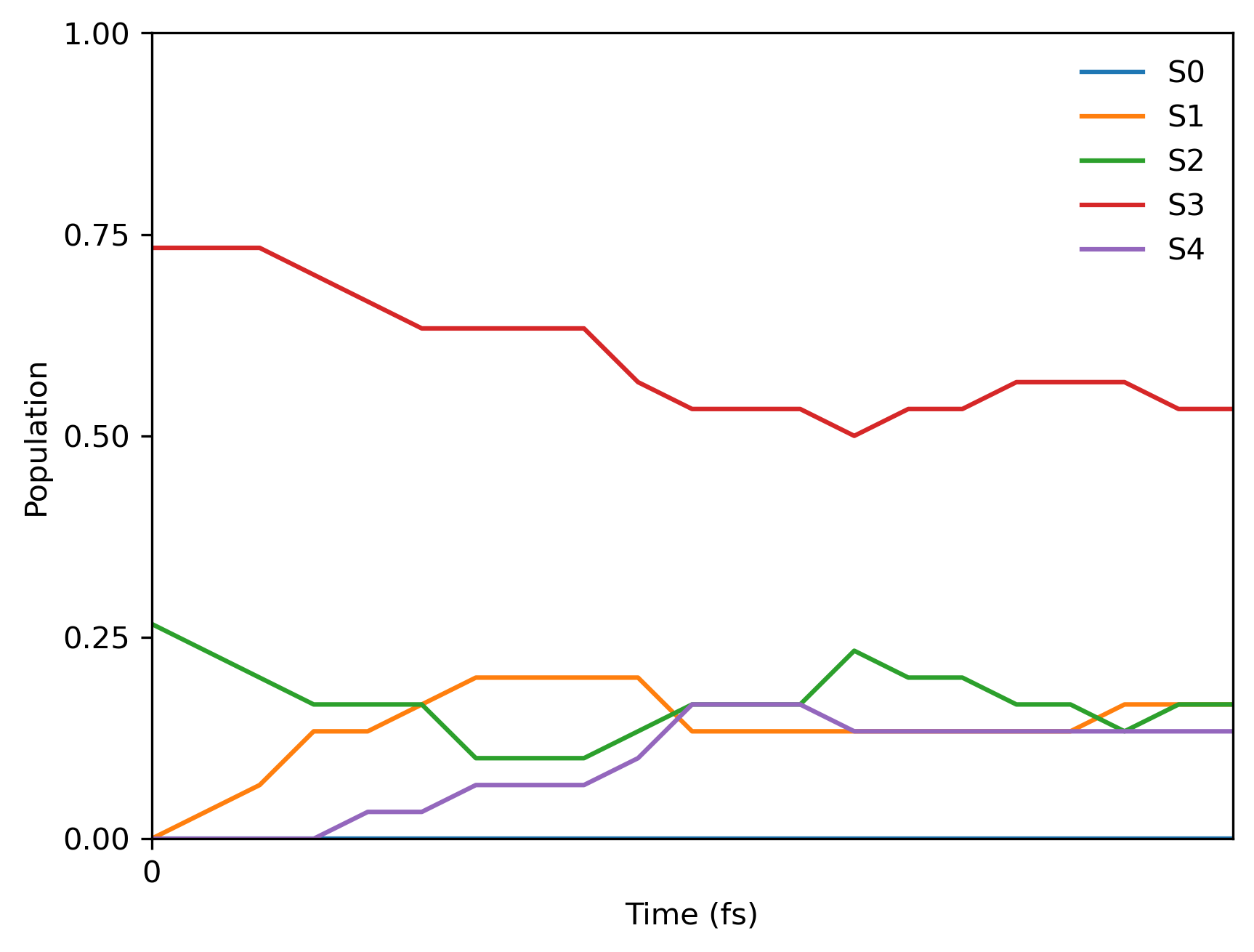
The tutorial calculations are very fast and you should be able to get the final population plot for 5 fs with 0.25 fs time step from 30 trajectories within a minute. Here is the Jupyter notebook code snippet:
import mlatom as ml
import os
import numpy as np

# Read initial conditions
init_cond_db = ml.data.molecular_database.load(filename='materials/init_cond_db_for_pyrazine.json', format='json')

# We need to create a class that accepts the specific arguments shown below and saves the calculated electronic state properties in the molecule object
class mlmodels():
    def __init__(self, nstates = 5):
        folder_with_models = 'materials/lz_models'
        self.models = [None for istate in range(nstates)]
        for istate in range(nstates):
            self.models[istate] = [ml.models.ani(model_file=f'{folder_with_models}/ensemble{ii+1}s{istate}.pt') for ii in range(2)]
            for ii in range(2): self.models[istate][ii].nthreads = 1

    def predict(self,
            molecule=None,
            nstates=5,
            current_state=0,
            calculate_energy=True,
            calculate_energy_gradients=True):

        molecule.electronic_states = [molecule.copy() for ii in range(nstates)]

        for istate in range(nstates):
            moltmp = molecule.electronic_states[istate]
            moltmpens = [moltmp.copy() for ii in range(2)]
            for ii in range(2):
                self.models[istate][ii].predict(molecule=moltmpens[ii], calculate_energy = True, calculate_energy_gradients = True)
            moltmp.energy = np.mean([moltmpens[ii].energy for ii in range(2)])
            moltmp.energy_gradients = np.mean([moltmpens[ii].energy_gradients for ii in range(2)], axis=0)

        molecule.energy = molecule.electronic_states[current_state].energy
        molecule.energy_gradients = molecule.electronic_states[current_state].energy_gradients

models = mlmodels()

# Arguments for running NAMD trajectories
timemax = 5 # fs
namd_kwargs = {
            'model': models,
            'time_step': 0.25, # fs
            'maximum_propagation_time': timemax,
            'dump_trajectory_interval': None,
            'hopping_algorithm': 'LZBL',
            'nstates': 5,
            'random_seed': 1, # making sure that the hopping probabilities are the same (should not be used in actual calculations!)
            'rescale_velocity_direction': 'along velocities',
            'reduce_kinetic_energy': False,
            }

# Run 30 trajectories
dyns = ml.simulations.run_in_parallel(molecular_database=init_cond_db[:30], task=ml.namd.surface_hopping_md, task_kwargs=namd_kwargs)
trajs = [d.molecular_trajectory for d in dyns]
ml.namd.analyze_trajs(trajectories=trajs, maximum_propagation_time=timemax)

# Dump the trajectories
for itraj in range(len(trajs)):
    trajs[itraj].dump(filename=f'traj{itraj+1}.json', format='json')

# Prepare the population plot
ml.namd.plot_population(trajectories=trajs, time_step=0.25,
                        max_propagation_time=timemax, nstates=5, filename=f'pop.png')
Since we used the fixed random seed, you should get the following final population:
16.6. Setup for calculations on your computer with AIQM1
Depending on the electron structure method or machine learning model, you might need to install the development version of MLatom and external programs such as MNDO (required for AIQM1 and semi-empirical QM), COLUMBUS (required for CASSCF), Turbomole (required for ADC(2)), or TorchANI (required for AIQM1 and ANI potentials). dftd4 is also required for AIQM1.
16.7. AIQM1
This tutorial consists of two parts:
single-point calculations to better understand how to use MLatom for excited-state calculations
surface-hopping dynamics building upon the previous example.
16.7.1. Single-point excited-state calculations
Please download the tutorial files (sp_aiqm1.zip).
To start, we provide the initial geometry for \(\text{CNH}_4^+\) in the cnh4+.xyz file, with coordinates in Angstrom, which looks like this:
6
symmetry c1
N        0.051443000     -0.125748000      0.596619000
C        0.067113000     -0.025698000     -0.683445000
H        0.002169000      0.695516000      1.199263000
H        0.087711000     -1.030762000      1.065358000
H        0.027120000      0.954772000     -1.143351000
H        0.120118000     -0.922908000     -1.288953000
Then we can use this geometry to calculate the excited-state properties at the AIQM1/CIS level (in the comments also for AIQM1/MRCI):
#!/usr/bin/env python
# coding: utf-8

import mlatom as ml

# get the molecule object
mol = ml.data.molecule()
mol.read_from_xyz_file('cnh4+.xyz')
mol.charge = 1

# define the method
aiqm1 = ml.models.methods(method='AIQM1')
# To run AIQM1/MRCI calculations, you can uncomment the following line and make sure that mndokw file is available (see below)
#aiqm1 = ml.models.methods(method='AIQM1',qm_program_kwargs={'read_keywords_from_file':'mndokw'})

# calculate electronic state properties
aiqm1.predict(molecule=mol,
                nstates=3, # Number of electronic states to calculate
                current_state=2, # Requests calculating properties for the S2 electronic state (the third one or second excited)
                calculate_energy=True,
                calculate_energy_gradients=[True, True, True], # requests calculating gradients for all three states
                #calculate_energy_gradients=True # requests calculating gradients only for the current state for many methods (but not for AIQM1 yet)
                calculate_nacv=False, # calculate nonadiabatic coupling vectors
                read_density_matrix=False)

# show the energy and gradients of each state
for i in range(len(mol.electronic_states)):
    print(f'Energy of state {i}, {mol.electronic_states[i].energy}')
    print(f'Energy gradients of state {i}')
    print(mol.electronic_states[i].energy_gradients)

# or alternatively:
print('Electronic state energies:', mol.state_energies)
print('Energy gradients in all electronic states')
print(mol.state_gradients)

# save the molecule object in file
mol.dump(filename="mol.json", format="json")
The output produced by the above Python script will look like this:
Energy of state 0, -94.87746605828193
Energy gradients of state 0
[[-2.20979325e-05 -3.09923481e-05  4.19648750e-04]
[ 1.84361461e-05  7.32504232e-05 -9.31292919e-04]
[-2.19042984e-04  4.91462433e-03 -8.93827657e-04]
[ 2.61506161e-04 -4.71725762e-03 -1.64437563e-03]
[ 1.19805843e-04 -2.90049761e-03  1.30834139e-03]
[-1.58607238e-04  2.66087287e-03  1.74150332e-03]]
Energy of state 1, -94.63515481241645
Energy gradients of state 1
[[ 5.04737245e-04  3.19599783e-03 -4.08726944e-02]
[ 4.00318642e-04  2.59615245e-03 -3.32555938e-02]
[ 2.10040873e-04  2.67707897e-05 -1.31297761e-02]
[ 1.06425061e-04  2.01394042e-03 -1.29785531e-02]
[-1.28339570e-04 -1.37049107e-02  4.93587653e-02]
[-1.09318226e-03  5.87204910e-03  5.08778502e-02]]
Energy of state 2, -94.58438542616139
Energy gradients of state 2
[[-3.22384930e-04 -1.95587619e-03  2.50398870e-02]
[ 1.58487817e-03  1.00715972e-02 -1.28916150e-01]
[-9.11050390e-06  3.73598849e-03 -1.03835407e-02]
[ 2.78260000e-04 -2.07710696e-03 -1.08367181e-02]
[ 2.43944556e-03 -6.96100621e-02  5.75290677e-02]
[-3.97108828e-03  5.98354594e-02  6.75674517e-02]]

Electronic state energies: [-94.87746606 -94.63515481 -94.58438543]
Energy gradients in all electronic states
[[[-2.20979325e-05 -3.09923481e-05  4.19648750e-04]
...
All results of the calculations will be dumped into mol.json which you can inspect to get a better idea how the data are stored in MLatom and how to access different properties through its Python API.
If you used AIQM1/MRCI, you would need to select active space and make other adjustments to the keywords passed to the MNDO program (see its documentation). In our case, you would need to use mndokw file which looks like this:
jop=-2 +
iop=-22 immdp=-1 igeom=1 iform=1 nsav15=3 +
icuts=-1 icutg=-1 kitscf=9999 iscf=9 iplscf=9 +
iprint=-1 kprint=-5 lprint=-2 mprint=0 jprint=-1 +
kharge=1 imult=0 nprint=-1 +
kci=5 movo=-1 ici1=2 ici2=1 jci1=1 jci2=1 nciref=0 +
iroot=3 iuvcd=2 +
ncisym=-1 ioutci=3 ipubo=1 +
ncigrd=3 icross=1
The output would be then:
Energy of state 0, -94.88480497779682
Energy gradients of state 0
[[ 1.34242995e-04  9.67083232e-04 -1.23502153e-02]
[-1.78362286e-04 -1.17842971e-03  1.50824778e-02]
[-9.10435874e-05  2.63194636e-03 -2.00336109e-03]
[ 1.56325835e-04 -2.28966888e-03 -2.38851941e-03]
[ 3.31705685e-05 -9.16708517e-04  7.62840787e-04]
[-5.43335121e-05  7.85777537e-04  8.96776412e-04]]
Energy of state 1, -94.63484529385708
Energy gradients of state 1
[[ 0.00050423  0.00321188 -0.04107714]
[ 0.00044946  0.00290478 -0.0372039 ]
[ 0.00017054  0.00049241 -0.01193939]
[ 0.00012002  0.001369   -0.01187431]
[-0.00012679 -0.01405619  0.0502662 ]
[-0.00111746  0.00607812  0.05182854]]
Energy of state 2, -94.56976745482731
Energy gradients of state 2
[[ 6.21429387e-03  3.96821088e-02 -5.07668904e-01]
[-6.24036735e-03 -3.98880933e-02  5.10344195e-01]
[-9.20936201e-05  2.29106816e-03 -1.36149279e-03]
[ 1.28184773e-04 -2.05330005e-03 -1.70182967e-03]
[ 9.81727653e-05 -2.05300286e-03  3.51054010e-05]
[-1.08190451e-04  2.02121919e-03  3.52925482e-04]]
16.7.2. Dynamics
Here we extend above example to show row to use the same method as before (AIQM1/MRCI) in propagating LZBL surface-hopping dynamics. Please download the tutorial files (namd_aiqm1.zip).
The script below does all the steps from start to finish:
optimizes geometry
runs frequency calculations
samples initial conditions from the Wigner distribution using Newton-X’s routines. Example can be extended to supports filtering by excitation energy window (refer to the manual for more details)
propagates multiple trajectories in parallel (here 16 trajectories for 5 fs with 0.1 fs time step)
saves trajectories in the h5md format
analyzes results by generating the population plots.
Here is the script:
import mlatom as ml

# Load the initial geometry of a molecule
mol = ml.data.molecule()
mol.charge=1
mol.read_from_xyz_file('cnh4+.xyz')

# Define methods
# .. for NAMD
aiqm1 = ml.models.methods(method='AIQM1',
                        qm_program_kwargs={'save_files_in_current_directory': True,
                                            'read_keywords_from_file':'../materials/mndokw'})
# .. for optimization, frequencies and normal mode calculations
method_optfreq = ml.models.methods(method='B3LYP/Def2SVP', program='pyscf')

# Optimize geometry
geomopt = ml.simulations.optimize_geometry(model=method_optfreq,
                                        initial_molecule=mol)
eqmol = geomopt.optimized_molecule
eqmol.write_file_with_xyz_coordinates('eq.xyz')

# Get frequencies
ml.simulations.freq(model=method_optfreq,
                    molecule=eqmol)
eqmol.dump(filename='eqmol.json', format='json')

# Get initial conditions
init_cond_db = ml.generate_initial_conditions(molecule=eqmol,
                                    generation_method='wigner',
                                    number_of_initial_conditions=16,
                                    initial_temperature=0,
                                    random_seed=1) # To ensure we always get the same initial conditions (should not be used in actual calculations)
init_cond_db.dump('test.json','json')

# Propagate multiple LZBL surface-hopping trajectories in parallel
# .. setup dynamics calculations
namd_kwargs = {
            'model': aiqm1,
            'time_step': 0.25,
            'maximum_propagation_time': 5,
            'hopping_algorithm': 'LZBL',
            'nstates': 3,
            'initial_state': 2, # Numbering of states starts from 0!
            'random_seed': 1 # To ensure we always get the same initial conditions (should not be used in actual calculations)
            }

# .. run trajectories in parallel
dyns = ml.simulations.run_in_parallel(molecular_database=init_cond_db,
                                      task=ml.namd.surface_hopping_md,
                                      task_kwargs=namd_kwargs,
                                      create_and_keep_temp_directories=True)
trajs = [d.molecular_trajectory for d in dyns]

# Dump the trajectories
itraj=0
for traj in trajs:
    itraj+=1
    traj.dump(filename=f"traj{itraj}.h5",format='h5md')

# Analyze the result of trajectories and make the population plot
ml.namd.analyze_trajs(trajectories=trajs, maximum_propagation_time=5)
ml.namd.plot_population(trajectories=trajs, time_step=0.25,
                        max_propagation_time=5, nstates=3, filename=f'pop.png', pop_filename='pop.txt')
And here is the final population plot (your plot will be different because of the random seed in initial conditions and hoppings):
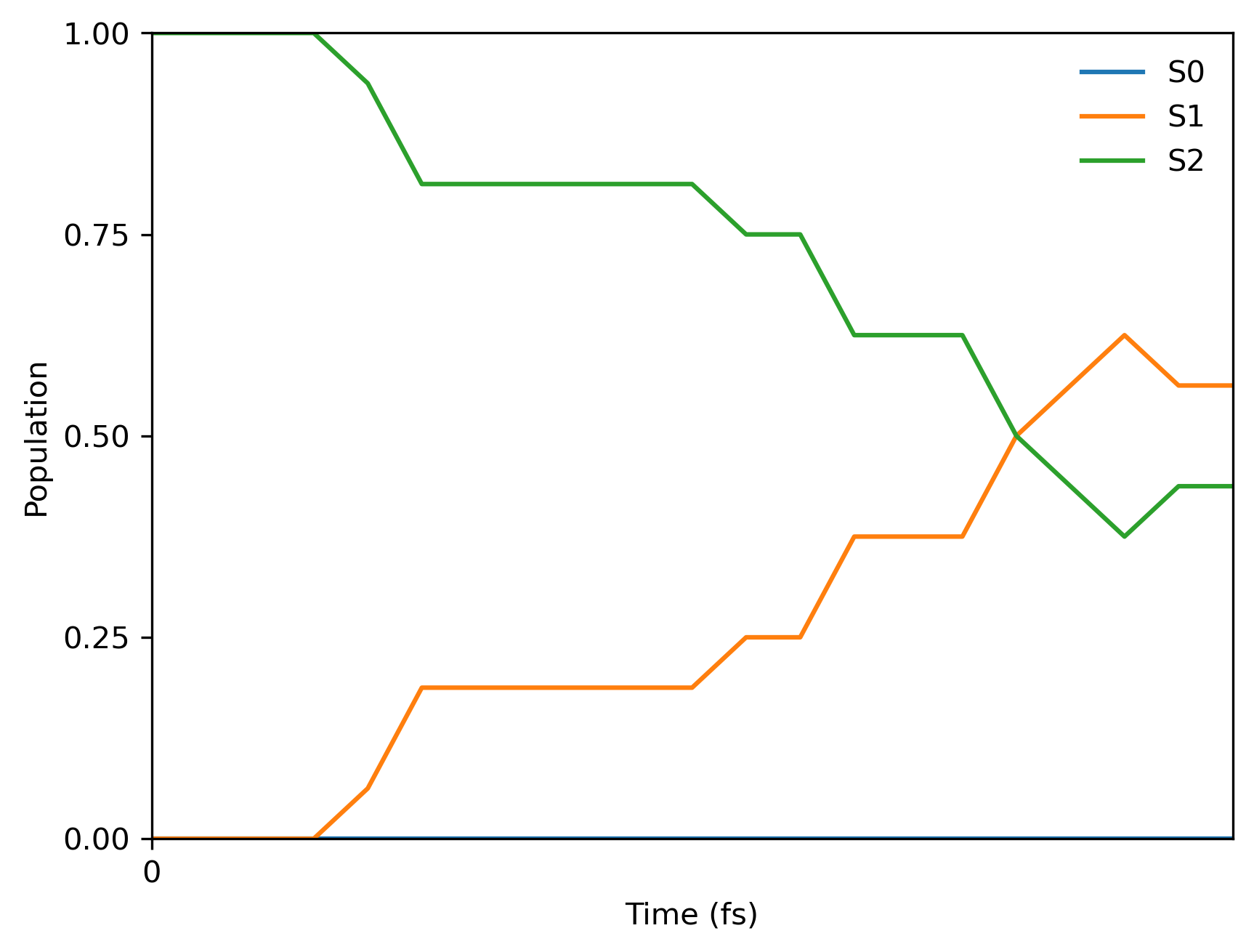
You will also get the text file with populations pop.txt which should look like:
0.000 0.0 0.0 1.0
0.250 0.0 0.0 1.0
0.500 0.0 0.0 1.0
0.750 0.0 0.0 1.0
...
Download the full file cnh4+_aiqm1cis_lznamd_population.txt.